Etsy Account Suspended But No Email? Here's What to Do
You try to log into your Etsy shop and something is wrong. Your listings are gone. Your dashboard shows a suspension notice. But when you check your inbox — nothing. No email from Etsy explaining what happened or why. If this sounds familiar, you're not alone. Here's exactly what to do next.
Why Etsy Sometimes Doesn't Send Suspension Emails
Etsy is supposed to send you an email every time they take action on your account. In practice, that doesn't always happen. There are several reasons why the notification might never reach your inbox.
- Spam and junk filters. Gmail, Outlook, and Yahoo all have aggressive spam filtering. Etsy's automated emails — especially ones with words like "suspended" or "violation" — often get caught.
- Outdated email address. If you changed email providers or let an old email lapse, Etsy is still sending notifications to an inbox you don't check. This is more common than you'd think.
- System delays and glitches. Etsy processes millions of seller actions daily. Sometimes the suspension hits your account before the email system catches up. Delays of 24–72 hours aren't unheard of.
- Security-triggered suspensions. When Etsy's fraud detection flags your account for suspicious login activity or payment anomalies, the suspension can happen instantly — before any notification is queued.
The bottom line: a missing email doesn't mean Etsy didn't have a reason. It just means their notification system failed you. Your job now is to figure out what happened and respond correctly. If you need a broader overview of the suspension process, start with our complete Etsy account suspended guide.
Where to Check First
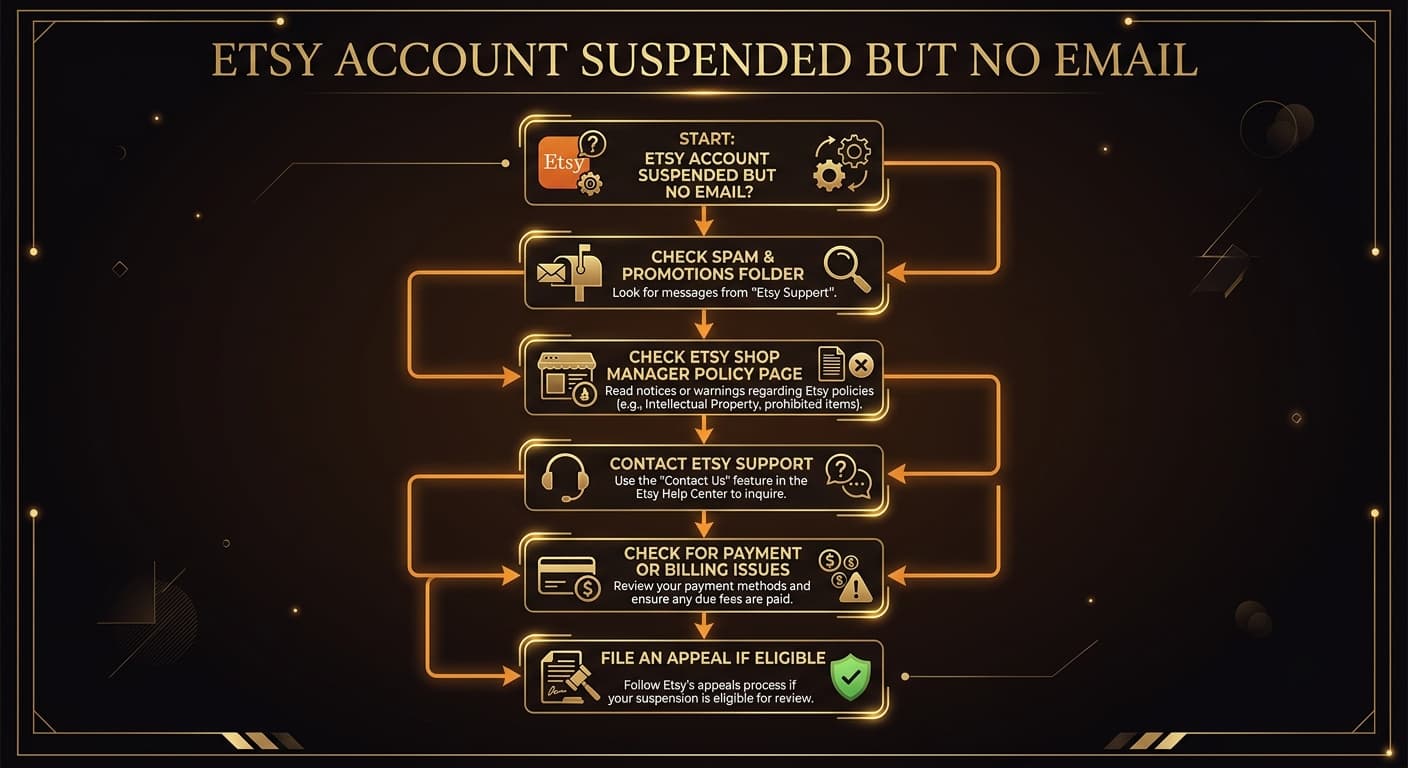
Before you panic, do a thorough sweep. The email might exist — it's just hiding.
Email checklist
- Spam/Junk folder. Search for "etsy" or "suspension" in your spam folder. Check the last 7 days.
- Promotions or Updates tab. Gmail sorts Etsy emails into the Promotions tab by default. Check there.
- All email addresses. Check every email you've ever used with Etsy. If you're not sure which one is linked, try logging in with each.
- Etsy Shop Manager. Log into your Etsy account directly. Even suspended accounts can usually access the Shop Manager. Look for a banner or notice explaining the suspension under "Your Account."
- Etsy's legal and policy page. Go to etsy.com/your/account and check for any policy violation notices. Some suspensions show the reason here even when no email was sent.
If a listing was removed alongside your suspension, our guide on what to do when Etsy removes a listing covers how to handle that separately.
How to Contact Etsy Support
If you've checked everywhere and still can't find an explanation, it's time to contact Etsy directly. Here are the channels that actually work.
Etsy Help Center
Go to help.etsy.com. Navigate to "My account" → "Account suspension." Even without logging in, you can submit a support request. Include your shop name, the email on file, and a clear description of what you see when you log in.
Email Support
If the help center doesn't work, email Etsy directly through the support form. Be specific: state your shop name, when you noticed the suspension, and that you did not receive a notification email. Ask them to resend the suspension notice.
Live Chat (When Available)
Etsy occasionally offers live chat for certain account issues. This option appears in the help center during business hours. If you see it, use it — it's the fastest way to get a human response about your suspension status.
Keep your tone professional and factual. Don't accuse Etsy of making a mistake. Simply state what happened and ask for clarification. Sellers who stay calm and cooperative get faster responses.
Common Reasons for Silent Suspensions
Some types of suspensions are more likely to happen without a clear email notification. These tend to be system-triggered rather than manual reviews by Etsy's Trust & Safety team.
Payment Verification Issues
Your bank declined a charge, your card expired, or Etsy couldn't verify your payment method. These trigger automatic account holds that don't always generate a suspension email.
Identity Verification
Etsy periodically requires sellers to verify their identity. If you miss the verification window — which is sometimes only communicated via a small banner in Shop Manager — your account gets locked.
Tax Information (W-9 / VAT)
US sellers who pass the $600 threshold must provide tax identification. Etsy can restrict your account if this information is missing or incomplete, often with minimal notice.
Security Flags
Logging in from a new device, a VPN, or a different country can trigger Etsy's fraud detection. These security holds happen instantly and the notification often comes later — or not at all.
Understanding these triggers helps you figure out the likely reason even without an official email. For a full breakdown of policy violations, see our Etsy account suspended guide.
What to Do While Waiting
The waiting period after discovering a suspension is stressful. Here's what to do — and what to absolutely avoid.
Do this
- Document everything. Screenshot your Shop Manager dashboard, any notices you see, your email search results, and any recent changes you made to your shop.
- Check your financials. Review your Etsy payment account for any failed charges, outstanding fees, or refund requests that might explain the hold.
- Review recent listing changes. Think about any new listings, title changes, or tag updates you made right before the suspension. These are clues.
- Save your order data. If you can still access your account, export your order history and customer information. You'll need this if you have outstanding orders to fulfill.
Don't do this
- Don't open a new account. This is the single biggest mistake suspended sellers make. Etsy detects duplicate accounts through IP addresses, payment methods, device fingerprints, and shipping addresses. A second account will be permanently banned.
- Don't spam Etsy support. Sending multiple emails or filing repeated tickets doesn't speed things up. It can actually slow down your case by creating duplicate tickets that need to be merged.
- Don't delete anything. Don't remove listings, change your shop name, or alter your account details. Etsy needs to review your shop as it was when the suspension happened.
How to Write an Appeal Without Knowing the Reason
This is the hardest part. You need to write a convincing appeal, but you don't even know what you're appealing. The good news: it's still possible to write an effective one.
Appeal structure when you don't know the reason
- Acknowledge the suspension. Start by stating that you're aware your account has been suspended and that you take Etsy's policies seriously.
- Note the missing notification. Politely mention that you did not receive an email explaining the reason. Ask Etsy to clarify which specific policy was violated.
- Show willingness to comply. State clearly that you're ready to make any necessary changes to bring your shop into compliance once you understand the issue.
- Provide context. Include your shop name, how long you've been selling, your track record (reviews, star seller status), and any recent changes you made.
- Close professionally. Thank them for reviewing your case and provide your preferred contact method.
For a full appeal template with exact wording you can copy, read our Etsy suspension appeal letter guide. It includes templates for every type of suspension, including situations where the reason is unknown.
Prevention: Don't Let This Happen Again
Once you get your account back, take these steps to make sure you never end up in this situation again.
- Keep your email current. Update your Etsy account email to one you check daily. Set a calendar reminder to verify it every 6 months.
- Whitelist Etsy's emails. Add @etsy.com and @mail.etsy.com to your email contacts so they never hit spam.
- Check Shop Manager weekly. Don't rely on emails alone. Log into Shop Manager at least once a week and look for any banners, warnings, or policy notices.
- Keep payment info updated. Expired cards and failed bank verifications are among the top causes of silent suspensions. Update your payment method before it expires.
- Complete all verification requests immediately. When Etsy asks for ID verification or tax info, do it the same day. Delays lead to automatic restrictions.
- Scan your listings for compliance. Use tools to check your titles, tags, and images against Etsy's policies before issues arise. Proactive compliance is the best protection.
Don't Wait for Another Silent Suspension
Unflagged screens the listing title, tags and description you provide for potential concerns, with explanations and policy references. It does not inspect images, query live trademark registers, monitor your shop or predict Etsy enforcement. Review the findings and verify the product facts before making changes.
Scan Your Shop FreeFrequently Asked Questions
Why didn't I get an email when Etsy suspended my account?
Etsy's suspension emails sometimes land in spam or promotions folders, get blocked by email providers, or are delayed by Etsy's system. In some cases, Etsy suspends accounts for security flags or payment verification without sending a standard suspension notice. Always check your spam folder and the email address linked to your Etsy account.
Where can I find out why my Etsy account was suspended?
Log into your Etsy account and check Shop Manager. Even while suspended, you can usually access a policy notice under Your Account or the Shop Manager dashboard. If nothing appears there, contact Etsy support through help.etsy.com and request a specific explanation.
Can I contact Etsy support if my account is suspended?
Yes. Go to help.etsy.com and navigate to 'My account' then 'Account suspension.' You can submit a support request even while suspended. Some sellers also have access to live chat during business hours. Etsy typically responds to suspension inquiries within 3-5 business days.
Should I open a new Etsy account if my old one was suspended?
No. Opening a new account after a suspension violates Etsy's Terms of Service. Etsy tracks IP addresses, payment methods, device fingerprints, and shipping addresses. A second account will be detected and permanently banned, making it much harder to recover your original shop.
How do I appeal an Etsy suspension if I don't know the reason?
Write a professional appeal acknowledging that a policy may have been violated, express willingness to correct any issues, and ask Etsy to clarify the specific violation. Provide your shop details, recent changes you've made, and a commitment to compliance. Being cooperative and professional is more effective than being defensive.
How long does Etsy take to respond to a suspension appeal?
Etsy typically takes 1-4 weeks to respond to suspension appeals. During high-volume periods, responses can take longer. Do not submit multiple appeals, as this can delay the process. Submit one well-written appeal and wait for a response before taking further action.
Related Guides
Etsy Account Suspended? The Complete Recovery Guide
The full guide to understanding and recovering from an Etsy suspension.
How to Write an Etsy Suspension Appeal Letter
Templates and strategies for appeals that actually get your shop reinstated.
Etsy Listing Removed? What to Do Next
Step-by-step guide when Etsy removes one or more of your listings.