Etsy Product Photography: Tips That Actually Sell (2026)
Your product might be incredible — but on Etsy, nobody buys what they can't see. Product photography is the single biggest factor in whether a shopper clicks your listing or scrolls past it. In 2026, with video auto-play on mobile and rising buyer expectations, the bar for listing photos has never been higher. This guide covers exactly what you need, what to shoot, and the mistakes that silently kill your sales.
1. Why Your First Photo Is Everything
When a shopper searches on Etsy, they see a grid of thumbnail images. That's it. They don't see your title first, they don't read your description, and they definitely don't check your reviews — not yet. The first image is your ad, your storefront, and your first impression all rolled into one.
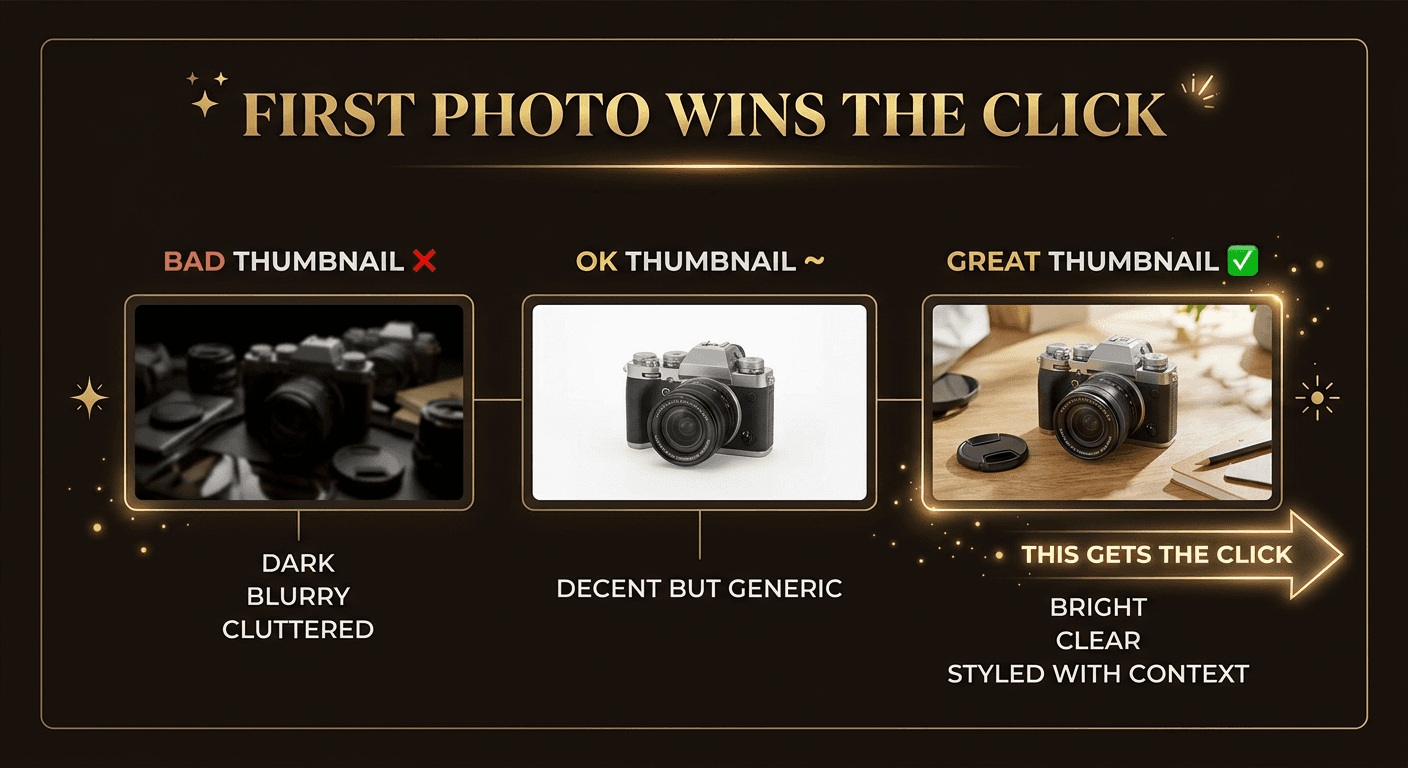
Buyers make split-second decisions. Research shows that online shoppers form an opinion about a product listing in under 50 milliseconds. On Etsy, that decision is almost entirely based on your thumbnail image. A crisp, well-lit, professionally composed hero shot can double or triple your click-through rate compared to a dark, cluttered, or blurry alternative.
This matters for more than just clicks. Etsy's algorithm tracks your click-through rate as part of your listing quality score. Listings that get clicked more often rank higher in search results, which brings more views, which drives more sales. Your first photo creates a compounding flywheel — or a downward spiral.
Think of your first image like a paid ad that runs 24/7, for free. It's worth spending real time getting it right. For more on how listing quality feeds into Etsy's ranking system, check out our Etsy SEO tips for 2026.
2. Equipment You Actually Need
One of the biggest myths in Etsy product photography is that you need an expensive camera. You don't. The best camera for Etsy photos is the one you already have — your smartphone. Modern phone cameras produce images that are more than sharp enough for online listings, and the bottleneck is almost always lighting and composition, not megapixels.
The Starter Kit (Under $50 Total)
- •Your smartphone. Any iPhone from the 14 and up or Samsung Galaxy S series will do the job. Clean the lens before every shoot — fingerprints are the number one cause of hazy product photos.
- •Natural light or a $30 lightbox. A window with indirect sunlight is free and produces beautiful, even lighting. For small items like jewelry, a portable lightbox (available on Amazon for around $30) gives you studio-quality results with zero skill required.
- •White or neutral background. A sheet of white poster board, a roll of white craft paper, or even a clean white bedsheet creates a professional backdrop. Seamless backgrounds eliminate distractions and make your product the star.
- •A phone tripod ($10–$15). Eliminates camera shake and lets you reproduce consistent angles across all your listings. Consistency builds trust and makes your shop look professional.
That's genuinely all you need to start. Top Etsy sellers making six figures use smartphone setups with natural light. The sellers who invest in expensive DSLR cameras but neglect lighting consistently produce worse results. Put your budget into lighting and backgrounds, not cameras.
3. The 8-Photo Checklist
Every listing should include these eight types of images. Etsy allows up to 10 photo slots plus a video — use them all. Listings that fill every slot convert at significantly higher rates than those with just 2 or 3 photos.
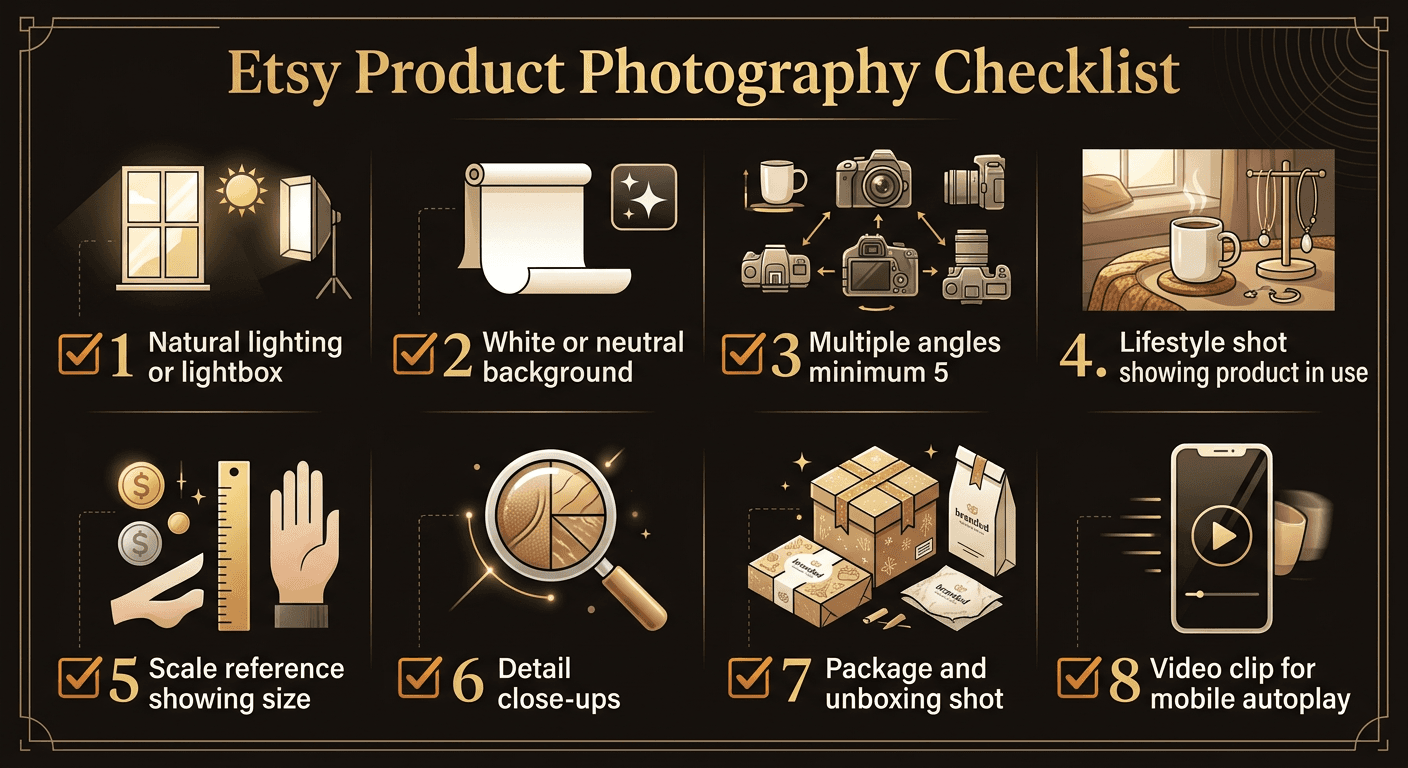
1. Hero Shot
Your main image. Clean background, perfect lighting, product centered and filling most of the frame. This is the image that appears in search results and determines whether shoppers click. No props, no text, no distractions — just your product looking its absolute best.
2. Multiple Angles
Show the front, back, side, and top of your product. Shoppers can't pick it up and turn it around, so your photos need to do that for them. Include at least 2–3 different angles to build confidence in what they're buying.
3. Lifestyle / In-Use Shot
Show the product being used or displayed in a real-life setting. A mug on a desk with a book, a necklace being worn, a print hanging on a wall. This helps buyers visualize owning your product and creates an emotional connection that clean product shots alone can't achieve.
4. Scale Reference
Place your product next to a common object — a hand, a coin, a pen, a standard mug — so buyers instantly understand the size. Misunderstood dimensions are one of the top reasons for returns and negative reviews on Etsy.
5. Detail Close-Ups
Zoom in on textures, stitching, engravings, material quality, or any fine detail that makes your product special. Close-ups communicate craftsmanship and justify your price. They also reduce "is it good quality?" questions in your inbox.
6. Packaging Shot
Show how the product arrives. Gift-ready packaging, branded boxes, tissue paper, thank-you cards — these details matter, especially for gift purchases. A beautiful unboxing experience can be the deciding factor for buyers choosing between two similar products.
7. Text Overlay with Key Features
One image with text callouts highlighting key features, materials, dimensions, or what's included. Think of it as an infographic for your product. Keep the text large enough to read on mobile and limit it to 3–5 bullet points. Use Canva to create these quickly.
8. Video Clip HIGH IMPACT in 2026
A 15–30 second video showing your product from all angles, being used, or being unboxed. In 2026, Etsy auto-plays videos on mobile search results, making this one of the highest-impact additions you can make. We cover video strategy in detail in section 7.
4. Lighting Tips
Lighting is the single most important variable in product photography. Great lighting makes a $10 product look premium. Bad lighting makes a $100 product look cheap. The good news is that the best light source is free.
Natural Light Techniques
- •Use window light. Position your product near a large window with indirect sunlight. The light should be coming from the side, not directly behind or in front of the product. Side lighting creates soft, natural shadows that give depth without harshness.
- •Shoot during golden hour or on overcast days. The hour after sunrise and before sunset produces warm, flattering light. Overcast skies act like a giant softbox, diffusing light evenly with no harsh shadows. Both are ideal for product photography.
- •Avoid direct sunlight. Direct sun creates hard, unflattering shadows and blown-out highlights. If you only have a sunny window, hang a white sheet or sheer curtain over it to diffuse the light. The difference is dramatic.
- •Use a white bounce card. Place a piece of white poster board opposite the window to bounce light back onto the shadow side of your product. This fills in dark shadows and creates even, professional illumination for free.
DIY Lightbox for Small Items
For jewelry, stickers, small crafts, and other items under 12 inches, a portable lightbox is a game-changer. These collapsible photo tents cost around $25–$35 on Amazon and come with built-in LED lights and interchangeable backgrounds. They produce consistent, studio-quality results regardless of the time of day or weather. Niche sellers can also benefit from AI identification tools — WatchLens for watch sellers who need instant model identification and BrickLens for LEGO resellers who want to verify set numbers from photos.
If you want to build your own, tape white tissue paper over a cardboard box with the front cut open. Place a desk lamp on each side shining through the tissue paper. The tissue diffuses the light exactly like a professional softbox.
5. Background and Styling
Your background sets the tone for your entire listing. The wrong background distracts from your product, makes it look cheap, or confuses the shopper about what they're actually buying. The right background makes your product the hero.
White for Clean Product Shots
White backgrounds are the standard for product photography because they eliminate distractions, make colors pop accurately, and look professional in search results. They also photograph consistently under different lighting conditions. Use white for your hero shot and angle shots.
Styled Scenes for Lifestyle Shots
For lifestyle images, create a scene that tells a story. A candle on a nightstand with a book and a soft blanket. A leather wallet on a wooden desk next to a coffee cup. Choose props that complement your product without competing with it. The product should still be the clear focal point.
Consistency Across All Listings
When a buyer visits your shop, your listings should look like they belong together. Use the same background style, the same lighting setup, and the same editing approach for every product. This creates brand cohesion and makes your shop look established and trustworthy. Inconsistent photos signal an amateur operation. Photography is just one piece of the puzzle — our Etsy shop branding guide covers banners, logos, and full visual identity.
Consistent, high-quality visuals across your shop also contribute to higher overall conversion rates, which feeds directly into Etsy's ranking algorithm. For more strategies on boosting your shop's performance, see our guide on how to increase Etsy sales.
6. Editing Your Photos
Editing is where good photos become great photos. You don't need Photoshop — free tools can do everything you need for Etsy listings. The goal is to enhance your images, not transform them. Buyers who receive a product that looks different from the photos will leave negative reviews.
Free Editing Tools
- •Canva (free tier). Best for adding text overlays, creating infographic-style images, and resizing. Also excellent for creating mockups for digital products.
- •Snapseed (mobile, free). The best free mobile photo editor. Powerful brightness, contrast, and selective adjustment tools. Use the "Tune Image" tool to brighten shadows and add contrast without blowing out highlights.
- •GIMP (desktop, free). A full-featured Photoshop alternative. Best for background removal, batch editing, and advanced retouching. The learning curve is steeper but the capabilities are professional-grade.
Editing Best Practices
- •Brighten, don't blast. Increase brightness and exposure just enough that the product is well-lit and details are visible. Over-brightening washes out colors and looks unnatural.
- •Boost contrast slightly. A small contrast increase makes the product pop against the background. Go too far and you lose detail in the shadows and highlights.
- •Don't over-filter. Instagram-style filters have no place in product photography. They distort colors and set false expectations. The product your buyer receives should look exactly like the photos.
- •Keep colors accurate. If your product is navy blue, make sure it looks navy blue in the photos — not royal blue, not black. Color inaccuracy is a top driver of returns and bad reviews.
7. Video in 2026
Video is no longer optional on Etsy. In 2026, Etsy auto-plays listing videos on mobile search results, which means your video plays silently as shoppers scroll — before they even tap on your listing. This is a massive visibility advantage that most sellers are still ignoring.
Listings with video see measurably higher click-through rates, longer dwell times, and better conversion rates. Etsy's algorithm rewards all three of these signals with higher search rankings. Adding video creates a compounding improvement across every SEO metric that matters.
Video Best Practices
- •Keep it 15–30 seconds. Short and focused. Show the product from all angles, then show it in use. Don't add music or narration — Etsy auto-plays on mute, so the video must communicate visually.
- •Start with your best angle. The first 2–3 seconds are the hook. Start with the same angle as your hero shot so there's visual continuity from the thumbnail, then rotate to reveal other angles.
- •Use the same lighting as your photos. Consistency between your photos and video builds trust. If your photos are bright and your video is dark, it creates doubt about what the product actually looks like.
- •Show scale and detail. Include a moment where a hand picks up or interacts with the product. This instantly communicates size and creates a tangible feel that photos alone can't replicate.
- •Shoot vertically for mobile. Most Etsy shoppers are on mobile. Vertical video fills the screen and looks native. Horizontal video will work but appears smaller on mobile devices.
8. Mockups for Digital Products
If you sell digital downloads — printable art, SVG files, planner templates, fonts, or any other digital product — you can't photograph something that doesn't physically exist. Mockups solve this by showing your digital product in a realistic context, helping buyers visualize what they're getting.
Mockup Tools
- •Placeit. The go-to mockup generator for Etsy sellers. Upload your design and it automatically places it on frames, mugs, t-shirts, tote bags, phone cases, and hundreds of other products. Subscription-based but worth it for high-volume sellers.
- •Canva mockups. Canva's free tier includes basic mockup templates for frames, devices, and packaging. The Pro tier unlocks thousands more. Great for sellers who already use Canva for their designs.
- •Show it in context. A printable wall art design should be shown in a framed mockup hanging on a wall in a styled room. A planner template should be shown on a tablet screen on a desk. Context helps buyers understand the product and envision using it.
For a deep dive into selling digital products on Etsy, including pricing strategies and niche selection, read our guide on how to sell digital downloads on Etsy.
9. Photo Mistakes That Kill Sales
These are the most common photography mistakes we see across thousands of Etsy listings. Each one costs you clicks, conversions, and ranking — often without you realizing it.
Dark or Blurry Images
The number one killer. If your photos are underexposed or out of focus, shoppers will scroll right past. Dark photos communicate low quality, even if the product itself is excellent. Always shoot with adequate light and use a tripod to eliminate blur.
Cluttered Backgrounds
Kitchen counters, messy desks, rumpled bedsheets — these backgrounds are shockingly common and immediately signal "amateur." Your product competes for attention with everything else in the frame. A clean background eliminates this problem entirely.
No Scale Reference
Without a scale reference, buyers guess the size — and they often guess wrong. This leads to returns, complaints, and negative reviews. A single photo with a hand or common object for scale prevents all of this.
Only 1–2 Photos
Using just one or two photos when Etsy gives you 10 slots is leaving money on the table. Fewer photos means less information, lower buyer confidence, shorter dwell time, and lower conversion rates. Every empty photo slot is a missed opportunity to close the sale.
Using Stock Photos
Stock photos for physical products destroy trust. Buyers know when an image looks too polished or generic. Worse, using someone else's photos can result in copyright strikes against your listing. For physical products, always shoot your own images. Stock mockups are fine for digital products only.
10. Great Photos + Compliance = Unstoppable
Stunning product photography gets your listings clicked, viewed, and purchased. But none of that matters if your shop gets suspended or your listings get taken down for a policy violation you didn't even know about.
In 2025–2026, Etsy has dramatically increased automated enforcement. Trademark violations, prohibited items, and policy breaches can result in listing removals or full shop suspensions — wiping out all the SEO equity and sales momentum you've built. The most successful Etsy shops invest in both great visuals and proactive compliance.
Protect Your Photography Investment
You've put the work into great photos. Don't let a compliance issue take your listings down. Unflagged scans your listings for trademark violations, policy breaches, and compliance risks before Etsy catches them — so your perfectly photographed products stay live and keep selling.
Scan Your Listings Free