Etsy Analytics: How to Understand Your Shop Data (2026 Guide)
Most Etsy sellers check their stats, see a number go up or down, and move on. That's not analytics — that's glancing. Real analytics means understanding why your numbers look the way they do and using that data to make smarter decisions about your listings, pricing, and marketing. This guide breaks down every metric in your Etsy dashboard and shows you how to turn raw data into more sales.
1. Why Analytics Matter
Running an Etsy shop without checking analytics is like driving with your eyes closed. You might get lucky for a while, but eventually you will crash into a problem you could have seen coming. Analytics tell you what is working, what is not, and where to focus your limited time and energy.
Data-driven sellers consistently outperform those who rely on gut feeling. When you know which listings convert, which search terms bring buyers, and where your traffic actually comes from, you can stop guessing and start making decisions that directly impact revenue.
The good news is that Etsy gives you a surprisingly powerful analytics dashboard for free. You do not need expensive tools to get started — you just need to know what to look at and how to interpret it. That is exactly what this guide covers.
2. Key Metrics Every Seller Should Track
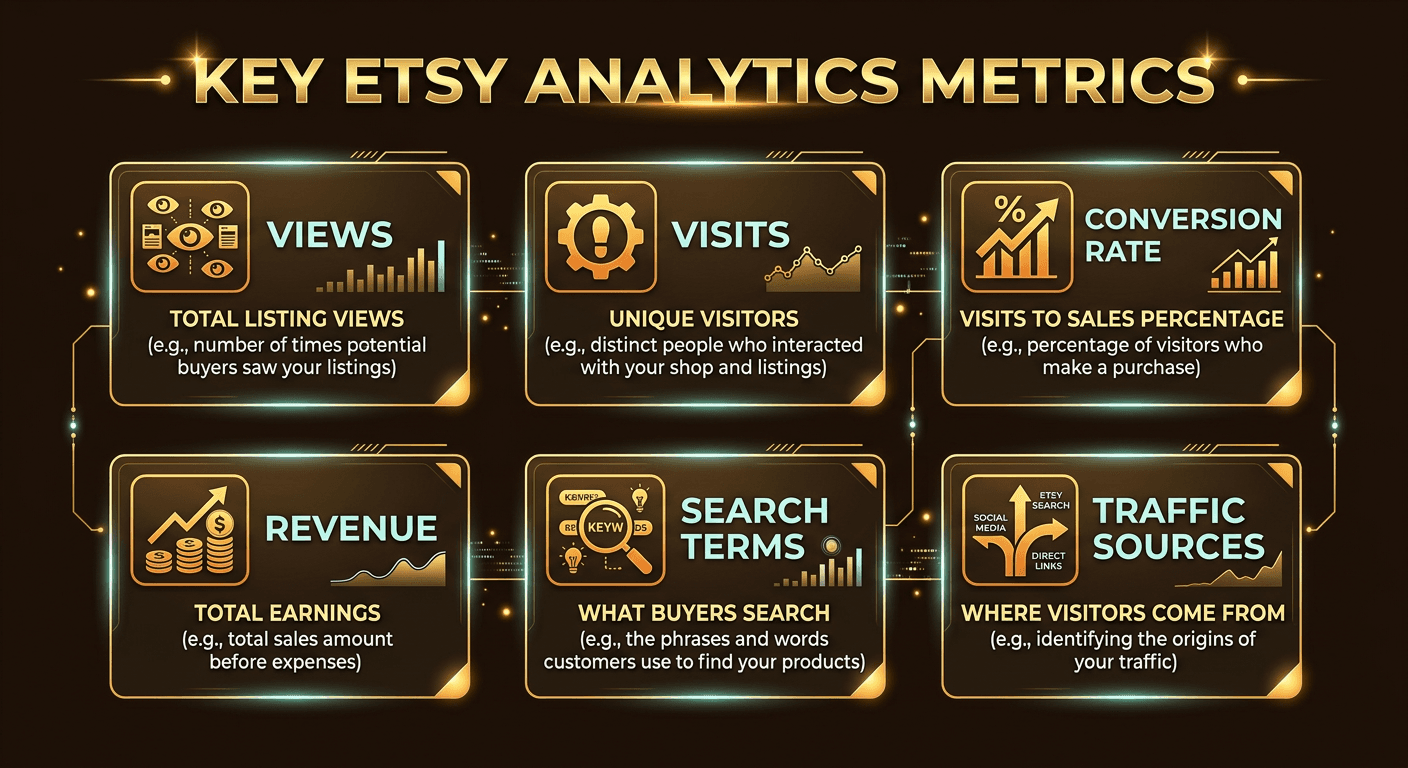
Etsy's Stats dashboard shows several metrics, but not all of them are equally important. Here are the five numbers that actually matter for growing your shop:
Views
Total impressions across all your listings. Every time a buyer sees any listing in your shop, that counts as a view. One person browsing five listings equals five views. This metric tells you how much overall exposure your shop is getting.
Visits
Unique visitors to your shop. Unlike views, visits count each person only once regardless of how many listings they browse. Visits are a better measure of actual traffic because they are not inflated by one person clicking around your shop.
Conversion Rate
The percentage of visits that result in a sale. Calculated as orders divided by visits, multiplied by 100. This is arguably the most important metric because it tells you how effectively your listings turn browsers into buyers.
Revenue
Total sales in dollars for the selected time period. Revenue alone does not tell the full story — you need to look at it alongside conversion rate and traffic to understand whether growth is coming from more visitors or better conversion.
Orders
The number of individual transactions. Track this alongside revenue to calculate your average order value. If orders are flat but revenue is growing, your average order value is increasing — which can be just as valuable as more sales.
Track these five metrics weekly. Write them down or keep a simple spreadsheet. Trends over time are far more useful than any single snapshot. A dip in one week is normal; a dip over four consecutive weeks is a signal that something needs to change.
3. Search Analytics and Buyer Keywords
This is the most underused section of Etsy analytics, and it is arguably the most valuable. The Search Terms report shows you the exact queries buyers typed into Etsy's search bar before landing on your listing. This is not guesswork or estimates — these are real searches from real buyers.
Pay attention to three things in your search data:
High-volume terms
Search terms that drive the most visits to your shop. These are your bread-and-butter keywords. Make sure they appear in your titles, tags, and descriptions. If a high-volume term is not in your listing title, add it.
Converting terms
Search terms that not only bring visitors but lead to actual sales. These are gold. Double down on them by creating more listings that target these exact phrases and making sure existing listings are optimized for them.
Surprise terms
Keywords you did not expect to see. These reveal how buyers think about your products, which is often different from how you describe them. Use these insights to adjust your language and uncover new keyword opportunities.
Your search analytics data feeds directly into your SEO strategy. For a complete breakdown of how to optimize your listings for Etsy search, read our Etsy SEO tips guide for 2026. The two work hand in hand — analytics shows you what buyers search for, and SEO optimization makes sure your listings show up for those searches.
4. Traffic Sources Breakdown
Knowing where your visitors come from is just as important as knowing how many you get. Etsy breaks traffic into several source categories, and each one tells a different story about your shop's discoverability.
Etsy Search
Visitors who found you by searching on Etsy. This should be your largest traffic source. If it is not, your SEO needs work — your titles, tags, and categories may not be matching what buyers search for.
Direct & Other Traffic
Visitors who typed your shop URL directly, clicked a bookmark, or came from a source Etsy cannot identify. A healthy amount of direct traffic usually means you have repeat customers or brand recognition outside of Etsy.
Social Media
Traffic from Pinterest, Instagram, Facebook, TikTok, and other social platforms. If you are actively promoting your shop on social media but this number is low, your links or calls to action may not be working effectively.
Etsy Ads
Visits generated by your paid Etsy Ads campaigns. Compare the cost of these visits against the revenue they generate to calculate your return on ad spend. If your ads cost more than the profit they produce, dial them back or refine your targeting.
Offsite Ads
Traffic from Etsy's offsite advertising program, which places your listings on Google, Facebook, Instagram, and other external platforms. Etsy charges a commission on sales from offsite ads, so track whether the extra revenue justifies the fee.
Other Etsy Pages
Visits from Etsy's home page recommendations, category pages, favorites, and other marketplace features. This traffic indicates that Etsy's algorithm considers your listings relevant and is actively recommending them to shoppers.
A diversified traffic mix is healthier than relying on a single source. If 95 percent of your traffic comes from Etsy search, any algorithm change could devastate your shop overnight. Building social media traffic and direct traffic gives you a safety net.
5. Listing Performance Analysis
Not all listings perform equally, and understanding why is one of the fastest ways to improve your shop. Etsy lets you see views, favorites, and orders for each individual listing. Use this data to sort your listings into three categories:
High views, low sales
These listings are getting seen but not converting. The problem is usually in the listing itself — your photos may not showcase the product well enough, your price may be too high compared to competitors, your description may lack key details, or your reviews may be thin. Fix the listing, do not just add more traffic.
High conversion rate
These are your winners. They turn visitors into buyers at an above-average rate. Promote them with Etsy Ads, share them on social media, and study what makes them convert so well. Can you create similar listings that target related keywords? Can you raise the price slightly without hurting conversion?
Low views, low sales
These listings are invisible. They are not ranking in search, which means your titles and tags need optimization. Revisit your keyword strategy, update your photos, and consider whether the product itself has demand. Sometimes the answer is to retire the listing and focus on what works.
For more strategies on turning underperforming listings into sales, check out our guide on how to increase Etsy sales.
6. How to Access Analytics in Shop Manager
Getting to your Etsy analytics is straightforward, but many new sellers do not realize how much data is available beyond the default overview. Here is how to find everything:
- Log in to Etsy and click Shop Manager in the top-left corner.
- In the left sidebar, click Stats. This opens your analytics dashboard.
- Use the date range selector at the top to view data for today, this week, this month, this year, or a custom range.
- Scroll down to see traffic sources, search terms, and listing performance breakdowns.
- Click on any individual listing title to see that listing's specific views, favorites, and orders over time.
The date range selector is critical. Looking at a single day is almost always misleading because Etsy traffic fluctuates heavily day to day. Compare week over week or month over month to identify real trends versus normal noise.
Etsy also shows a "How buyers found your listings" section that breaks down whether visitors came from search, ads, social media, or direct links. Spend time here — it tells you which of your marketing efforts are actually driving results.
7. What Good Benchmarks Look Like
Numbers in isolation are meaningless. A 2 percent conversion rate could be great or terrible depending on your niche, price point, and competition. Here are general benchmarks that most Etsy sellers can use as reference points:
Average
1–3%
Conversion rate. Most shops fall here, especially those with broad product ranges or higher price points.
Good
3–5%
You are above average. Your listings, photos, and pricing are working well together. Optimize, do not overhaul.
Excellent
5%+
Top-tier performance. Usually seen in niche shops with strong photos, competitive pricing, and excellent reviews.
Keep in mind that conversion rate varies significantly by category. Digital downloads tend to convert higher because of instant delivery and lower price points. Expensive handmade items convert lower because buyers take more time to decide. Compare yourself against shops in your specific niche, not Etsy-wide averages.
Beyond conversion rate, here are a few other benchmarks to keep in mind:
Favorite-to-sale ratio: Roughly 1 sale per 20 to 50 favorites is typical. If your ratio is much worse, buyers like your product but something stops them from purchasing — usually price or shipping cost.
View-to-favorite ratio: About 3 to 10 percent of viewers should favorite your listing. Lower means your photos or price are not grabbing attention.
Etsy search share: At least 40 to 60 percent of your traffic should come from Etsy search. Lower suggests your SEO needs improvement.
8. Using Analytics to Improve Your Shop
Data is only useful if you act on it. Here is a practical framework for turning your Etsy analytics into actual improvements:
Weekly Review Routine
Set aside 15 to 20 minutes every week to check your stats. Look at views, visits, conversion rate, and revenue compared to the previous week. Note any significant changes. Check which search terms are trending up or down. Review your top and bottom performing listings. This simple habit alone puts you ahead of most sellers.
A/B Testing Titles and Photos
If a listing gets views but no sales, change one thing at a time and wait a week to see results. Swap the main photo first — this has the biggest impact on click-through rate. If that does not move the needle, try adjusting the title to include higher-intent keywords. Then test pricing. Never change everything at once or you will not know what worked.
Doubling Down on Winners
Your best-converting listings deserve more attention, not less. Promote them with Etsy Ads to drive more traffic to listings you already know convert well. Create variations or complementary products. Use the search terms that drive sales to those listings as inspiration for new listings that target related keywords.
Seasonal Planning
Use year-over-year data to anticipate seasonal trends. If your analytics show a traffic spike every October, start preparing Halloween-themed listings and updating tags in September. If revenue dips every January, plan a promotion or launch new products to fill the gap. Data from past years is your most reliable predictor of future patterns.
9. Third-Party Analytics Tools
Etsy's built-in stats are a solid starting point, but they have limitations. Third-party tools fill the gaps with deeper keyword data, competitor analysis, and trend tracking that Etsy does not offer natively.
eRank
The most popular Etsy analytics tool. eRank offers keyword research, listing audits, competitor tracking, trend data, and shop performance monitoring. The free tier covers basic keyword research; paid plans unlock historical data, bulk analysis, and advanced keyword tracking. Essential for serious sellers.
Alura
Alura focuses on product research and market analysis. It estimates sales volume for competing listings, tracks trending products, and provides keyword suggestions based on actual marketplace data. Particularly useful for finding profitable niches and validating new product ideas before you invest time creating them.
Sale Samurai
Sale Samurai specializes in keyword analytics and listing optimization. It provides search volume estimates, competition scores, and tag recommendations. Its Chrome extension overlays data directly on Etsy search results, making it easy to analyze competitors while browsing the marketplace.
All three tools offer more granular data than Etsy's native stats. If you are running a shop with more than a handful of listings, at least one of these tools is worth the investment. For a full comparison, see our best Etsy seller tools for 2026 guide.
Your Analytics Look Good — But Are Your Listings Safe?
High-performing listings can disappear overnight if they trigger a policy violation. Unflagged scans your titles, tags, descriptions, and images for trademark conflicts, prohibited content, and compliance risks — before Etsy takes action.
Scan Your Listings Free